On 23 October 2026, Swedish public radio reported that the Swedish Government Offices would block ChatGPT and Claude on staff computers from Monday 26 October, keeping only the tools they have approved, Copilot among them. It is a good moment to ask the same question in a company of 20 people.
What exactly did the Swedish government decide?
According to Ekot, the news service of Sveriges Radio (report of 23 October 2026), the Government Offices (Regeringskansliet) are blocking ChatGPT and Claude on staff work computers from the following Monday. The stated aim: staff should use approved services, including Microsoft Copilot. The digital director wrote on the intranet that using AI services "without an agreement" can have consequences for information security.
Four details change how this news should be read:
- Ekot does not describe the contract with each vendor, nor why Copilot was chosen. Approving Copilot is therefore not a security ranking of the three tools.
- Some staff keep access to ChatGPT and Claude through an internal platform built by the Government Offices. What is cut is direct access, outside any framework.
- Similar blocks are in place at the Swedish Tax Agency (Skatteverket) and at SiS, the agency running youth care institutions, according to the same report.
- An internal audit at the Swedish Transport Administration (Trafikverket) found around ten open AI services in use, with examples of problematic use, both in how sensitive the information entered was and in how the generated answers were handled.
The lesson for a small business is in the last point: before choosing a tool, find out which ones are already in use.
Why a 20-person company faces the same question
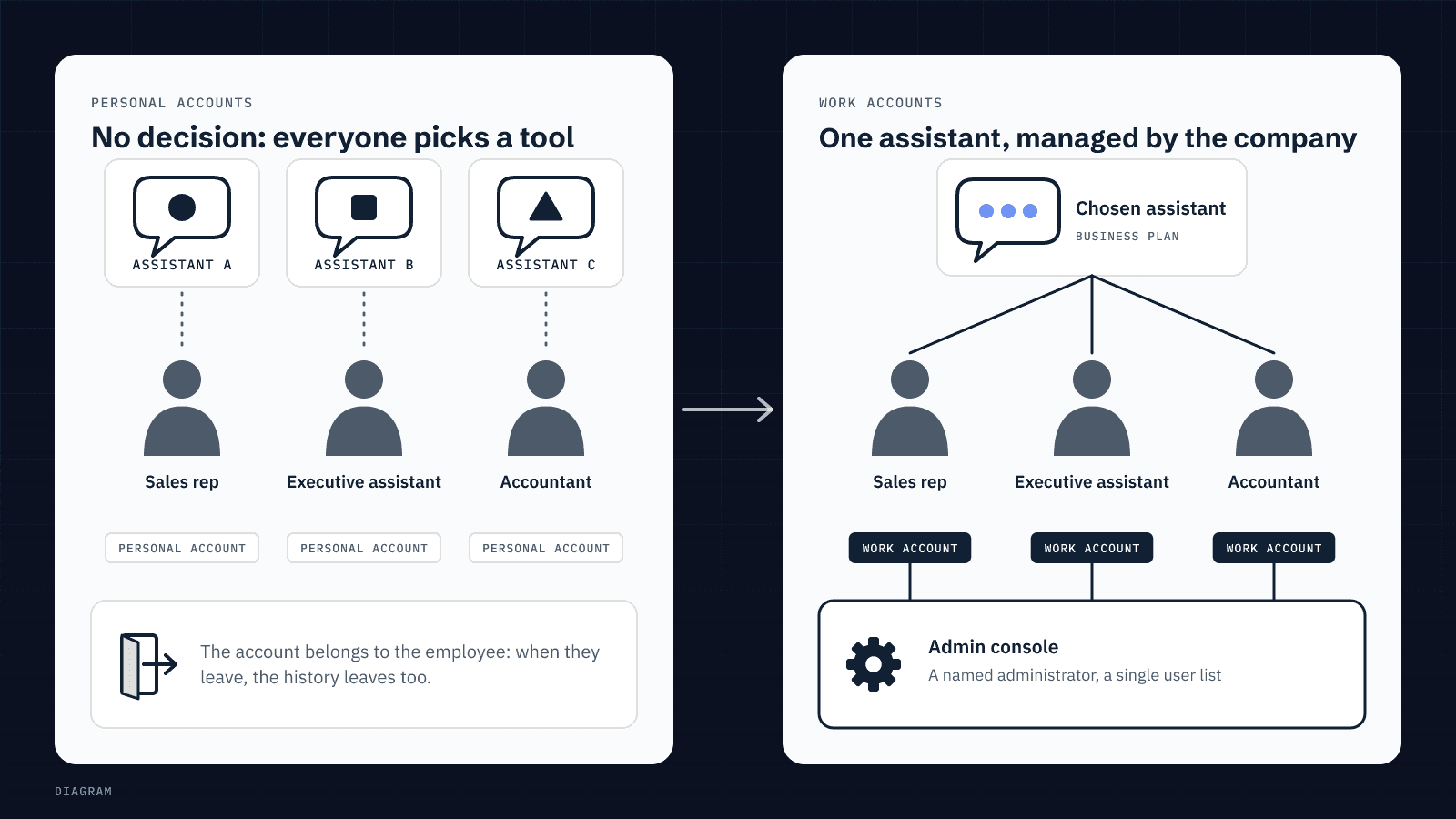
Because without a decision, everyone chooses. The salesperson drafts follow-ups in ChatGPT on a personal account, the office manager summarises contracts in Claude, the bookkeeper tries Copilot because it came with Microsoft 365. Nobody did anything wrong, and yet nobody knows where the quotes, customer records or price lists pasted into these tools have gone.
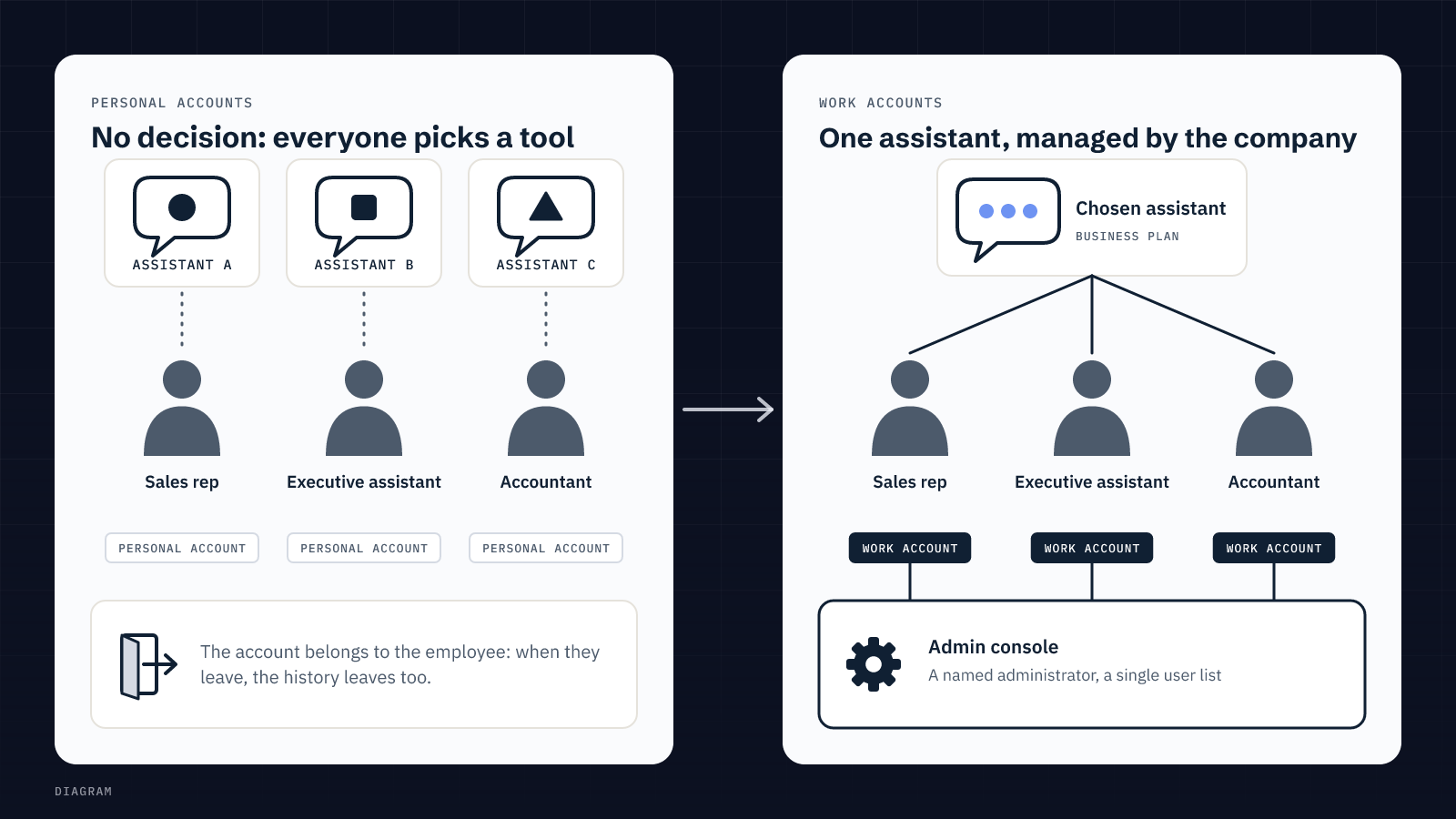
The real issue is the account: a personal account belongs to the employee, not the company. When they leave, the history leaves with them, and you never controlled the privacy settings.
Decision 1: which account, under which contract?
Vendors split their plans into two families, and their commitments on your data differ. Here is what each one states, checked on their pages on 25 October 2026:
| Vendor | Plans for organisations | What it says about training | Data processing agreement |
|---|---|---|---|
| OpenAI (ChatGPT) | ChatGPT Business, Enterprise, API platform | No training on business plan data by default (Enterprise privacy). On personal Free, Plus and Pro workspaces, data sharing to improve models is on by default (Data controls). | DPA offered to business customers (Enterprise privacy page) |
| Anthropic (Claude) | Claude for Work (Team, Enterprise), API | Inputs and outputs from commercial products not used for training by default, unless the user sends feedback, such as thumbs up or down (Anthropic Privacy Center, 18 August 2026). Consumer plans follow other rules. | DPA with standard contractual clauses |
| Microsoft (Copilot) | Microsoft Copilot and Copilot Chat used by an organisation | Prompts, responses and Microsoft 365 data not used to train foundation models (Microsoft Learn) | Microsoft Data Protection Addendum, Microsoft acting as processor |
Two caveats. At Microsoft, web queries sent to Bing fall outside that contract: Microsoft acts there as an independent controller, and the EU Data Boundary does not apply to them (same Microsoft Learn page). At Anthropic, the owner of a Team or Enterprise plan can switch off the feedback button for the whole organisation. These settings exist, provided someone in your company is the administrator.
The takeaway: all three vendors offer a contractual framework for businesses. The gap that matters is between a managed work account and a personal one, far more than between brands.
Decision 2: which assistant, for which use?
Start from what your teams already do. The CNIL says the same in its Q&A on generative AI (18 July 2024): start from concrete needs and scale requirements to the risk. Helping draft a letter carries less risk than helping decide on a job applicant or a customer's credit.
- You already work in Microsoft 365: Copilot reads your email and files with each user's permissions. Convenient, and also the reason to check folder sharing rights before switching it on.
- Your teams draft, summarise and rewrite: a chat assistant on a business plan (ChatGPT Business, Claude Team) is often enough, without connecting it to your tools.
- You want a task to run by itself (sorting requests, preparing quotes): then you need an agent, with its own access. We explain the difference in AI assistant or AI agent: which one for which task.
One assistant per use simplifies everything else: one admin console, one user list, one policy to explain.
Decision 3: which data may go in?
Write three columns on one page: what may go in, what may go in with care, what never goes in. The CNIL gives the test: for non-confidential uses, a consumer service can be considered with dedicated work email addresses, avoiding personal addresses and turning off data reuse where possible. As soon as customer or employee data, or sensitive documents, go into the tool, you need a data processing agreement with the provider, and safeguards if data leaves the European Union.
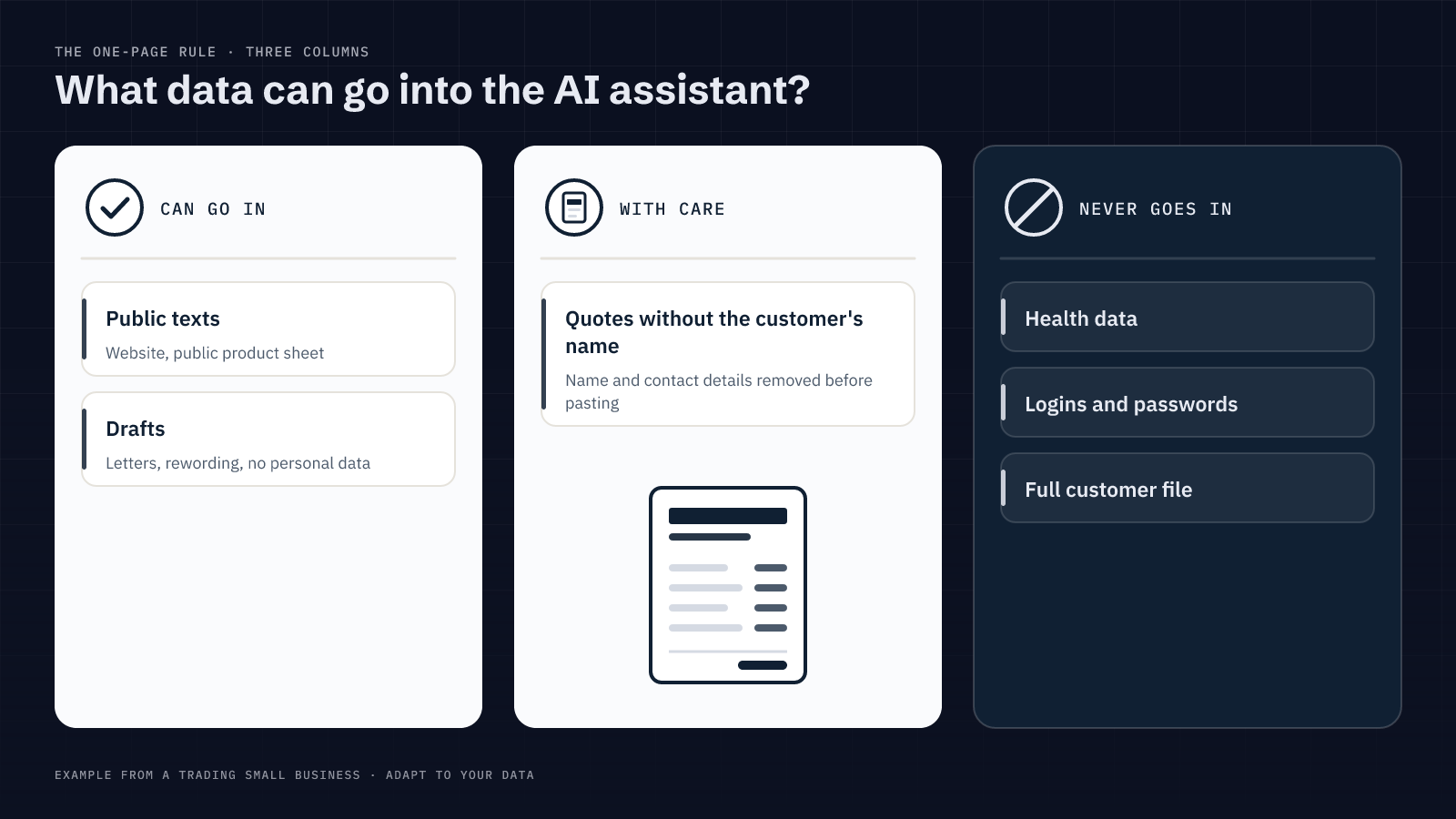
In a distribution business, for example: a public product sheet may go in; a quote may go in without the customer's name; a full customer file, credentials or health data do not. The rule fits on one page, which is what makes it usable.
Decision 4: who answers for what the assistant produces?
The CNIL points out that these systems can produce answers that are wrong but plausible, and that trusting them without checking leads to bad decisions. The Trafikverket audit flagged the same thing: how the answers were used, on top of what was typed in.
So name one person per use who reviews before anything goes out: a quote, an email to a customer, a reply to an applicant. We apply the same rule to our own agents: they prepare, and nothing reaches a third party until a human has approved it. If you go further and give an agent access to your systems, read what to open to an AI agent, and what to keep.
Should you ban ChatGPT at work?
Banning without offering an alternative only moves the problem: people carry on from their phones. Even the Swedish Government Offices did not cut everything: they closed direct access and kept a managed route for some staff. For a small business, the equivalent is to block personal accounts for work and open a work account on the chosen tool, with a one-page policy.
If your teams built custom GPTs or automations on personal accounts, plan their migration: we explain how in migrating custom GPTs.
Where to start this week
- Ask each team which assistants they use, on which account, for what. No blame: the goal is an inventory.
- Pick one assistant per use and open it on a business plan, with work email addresses and a named administrator.
- Check the vendor's data processing agreement and reuse settings, then write the three-column data rule.
- Name who reviews what before it goes out, and revisit the list every six months.
What this article does not tell you: how many small businesses are in this situation. We do not yet have reliable figures on that; we will publish them when we do.
FAQ
Is ChatGPT Plus enough for business use?
ChatGPT Plus is a personal plan: according to OpenAI, data sharing to improve models is on by default, and the account belongs to the employee. For team use, the Business or Enterprise plans give central administration and written commitments on your data.
Is Copilot safer than ChatGPT or Claude?
Nothing supports that as a general rule. All three vendors offer business plans with a data processing agreement and a no-training-by-default commitment. Copilot has the advantage of reusing the permissions already set in Microsoft 365, which assumes those permissions are set correctly.
Do I need a data processing agreement with the AI vendor?
Yes, as soon as personal data about customers or employees goes into the tool, according to the CNIL. The agreement sets out responsibilities and access to the data, and transfers outside the European Union must be covered.
How do I find out which AI tools my employees already use?
Ask, team by team, and explain that the aim is to choose a shared tool. Firewall or email logs can add detail, but asking directly usually gives the most complete answer.